# The failure policy
Setup: the demo's `Orders` schema, which every example on this page uses
``` python
import dagster as dg
import dataframely as dy
import polars as pl
import dagster_dataframely as dd
from dagster_dataframely_demo.schema import Orders
```
Whether the asset has `quarantine=True` determines what a run does with invalid rows. There is no lenient mode and no strict flag.
| what the function returned | the table | the quarantine | checks | run |
|----|----|----|----|----|
| columns or dtypes that are not the schema's | not written | not written | the column-schema check fails, blocking | fails, [ColumnSchemaError](../reference/errors.ColumnSchemaError.md#dagster_dataframely.errors.ColumnSchemaError) |
| every row valid | written | not written | all pass | succeeds |
| some rows failed, no quarantine declared | not written | n/a | fail at `ERROR` | fails, [ValidationAbortError](../reference/errors.ValidationAbortError.md#dagster_dataframely.errors.ValidationAbortError) |
| some rows failed, quarantine declared | the valid rows | the invalid rows | fail at `WARN` | succeeds |
| every row failed, quarantine declared | not written | every row | fail at `ERROR` | fails, [NoValidRowsError](../reference/errors.NoValidRowsError.md#dagster_dataframely.errors.NoValidRowsError) |
| `None`, meaning no source data | skipped | not written | all pass | succeeds |
Each row of the table is one of the six outcomes a run can have. The outcome, not the rule, determines the severity of the rules' checks, so they all have the same severity in a run. When the column-schema check fails, its severity is always `ERROR`.
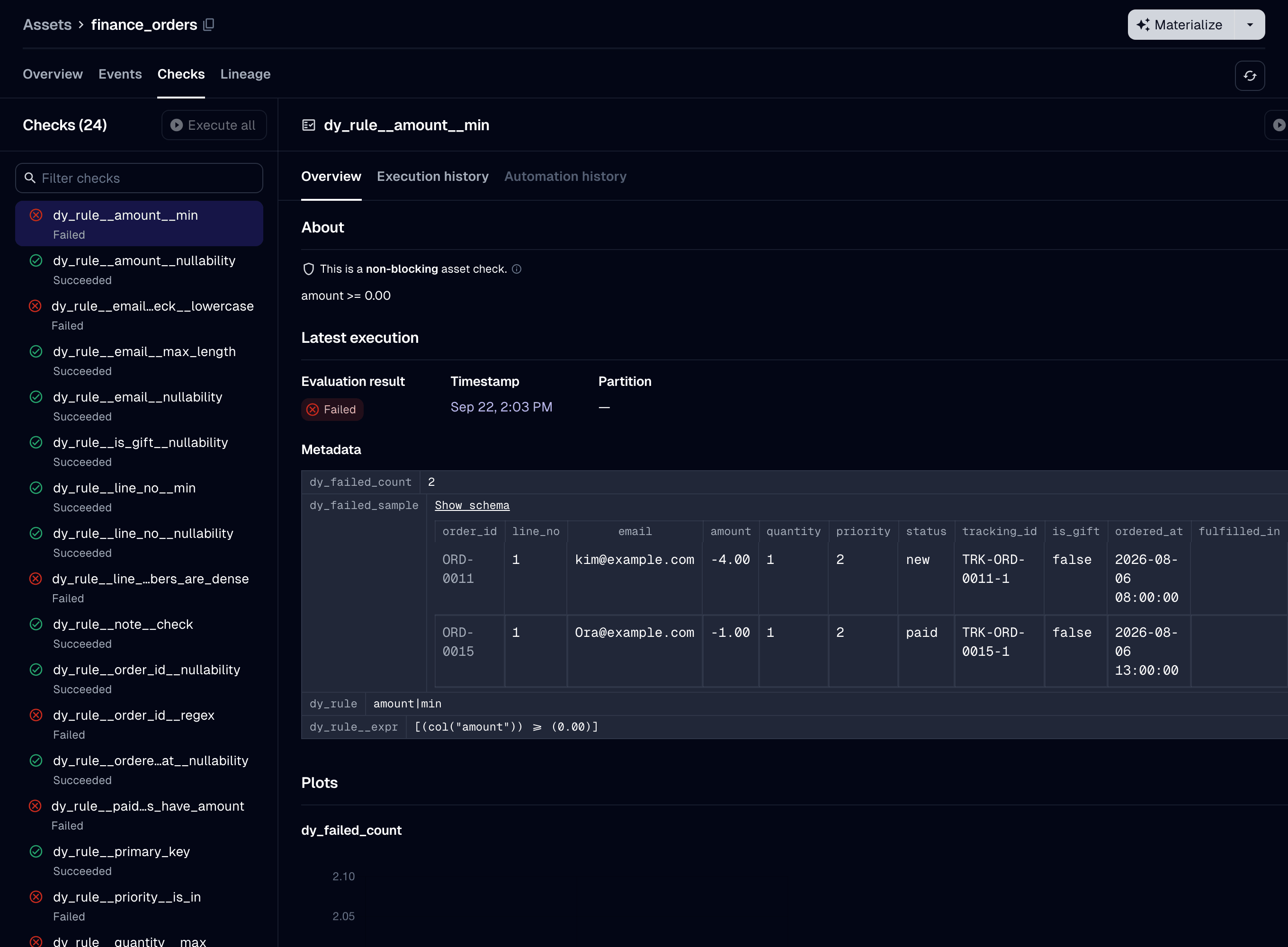
The Checks tab of an asset with no quarantine declared, after some rows failed. The failing checks have severity ERROR, not the WARN they have when the asset declares a quarantine. That is the difference between the third and fourth rows of the table.
The run log shows the step failure. The [ValidationAbortError](../reference/errors.ValidationAbortError.md#dagster_dataframely.errors.ValidationAbortError) message lists how many rows failed each rule. The counts add up to more than the number of invalid rows, because one row can fail several rules.
**Without a quarantine, every row has to be valid.** A run with even one failing row writes nothing, so the last-known-good table is unchanged. No setting discards the invalid rows and writes the rest. To drop invalid rows, drop them yourself in the decorated function:
``` python
@dd.asset(Orders)
def orders(raw_orders: pl.DataFrame) -> pl.DataFrame:
valid, _ = Orders.filter(raw_orders)
return valid
```
**With a quarantine, a run where every row fails still fails.** It writes no table rather than an empty one, so an empty table never replaces the last-known-good table. It writes every row to the quarantine before it raises [NoValidRowsError](../reference/errors.NoValidRowsError.md#dagster_dataframely.errors.NoValidRowsError), so you can read the rows after the run fails.
# The package never casts
The column-schema check compares your frame's dtypes with the schema's and fails the run on a mismatch. `Schema.filter` runs with `cast=False`. A dtype mismatch is a bug in the pipeline, and a silent cast can write wrong values. For example, a cast from `Float64` to a declared `Int64` turns `1.9` into `1`, and every rule still passes.
The check runs before `Schema.filter`, without executing the plan. It reports every mismatched column at once.
**Extra columns and column order are not a mismatch.** The check compares only the columns the schema declares, and `Schema.filter` drops any other column. The table has the schema's columns in the schema's order, whatever order the frame had:
``` python
@dd.asset(Orders)
def orders(raw_orders: pl.DataFrame) -> pl.DataFrame:
# `net` is working state, and `raw_orders` carries columns `Orders` never declared.
# Both are dropped. What materializes is the schema's thirteen columns, in its order.
return raw_orders.with_columns(net=pl.col("amount") * 0.8)
```
So a decorated function that returns extra columns needs no `select`, and no `Schema.cast` to drop them.
**To cast, call `Schema.cast` in the decorated function:**
``` python
@dd.asset(Orders)
def orders(raw_orders: pl.DataFrame) -> pl.DataFrame:
return Orders.cast(raw_orders)
```
This is the intended way to cast, not a workaround, and few assets need it. An asset needs it when its source returns a dtype that differs from the schema's, most often on a read from a warehouse. DuckDB returns `DECIMAL` where the schema declares `Float64`, so an asset that reads from `DuckDBPolarsIOManager` fails the column-schema check on its first run unless it casts. If you cast in every asset, check whether the dtypes differ at all, because dropping extra columns never needs a cast ([\#88](https://github.com/ozanozbeker/dagster-dataframely/issues/88)).
The package casts only columns it generates. It casts the quarantine's rule columns from `Enum` to `String`, because an `Enum` column makes the Delta writer panic with a Rust `unreachable!()`.