Appendix F — Northwind Dataset
About the Dataset
The Northwind dataset represents a fictional wholesale company that imports and exports specialty foods worldwide. Originally created by Microsoft as a sample database for Access and SQL Server, it has become one of the most widely used teaching datasets for relational databases.
Throughout this book, we use a modernized version of Northwind that includes realistic business features like customer segments, payment methods, order statuses, and industry classifications. The dataset contains sales transactions, customer information, product catalogs, employee records, and supplier relationships, all structured in a normalized relational model that mirrors real-world business systems.
Dataset Structure
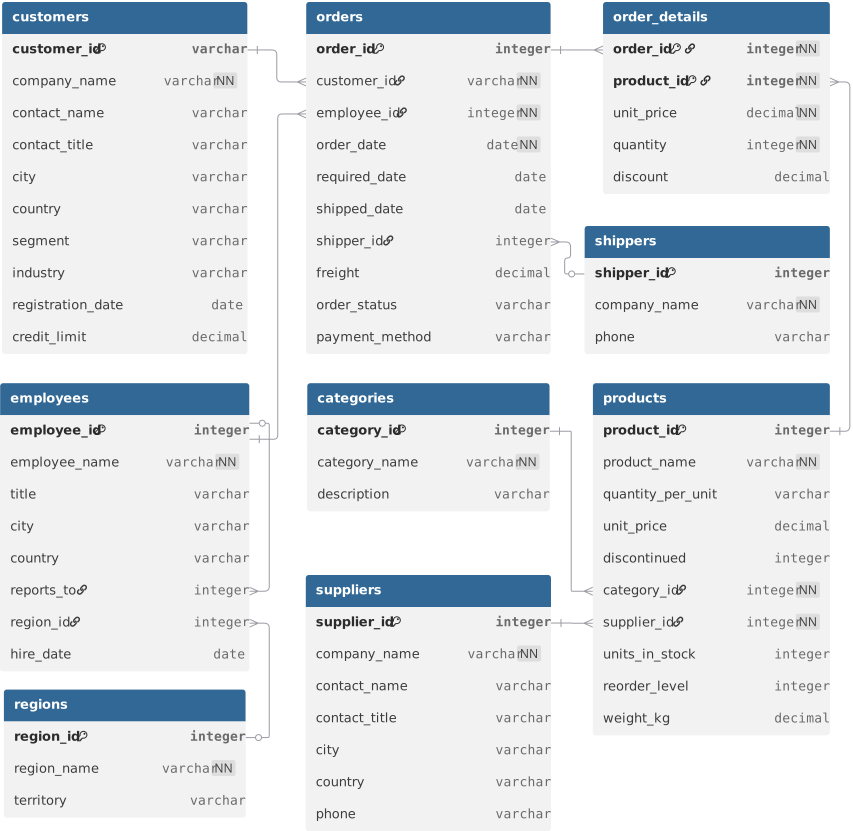
The Northwind database consists of nine tables:
- Orders: Customer orders with dates, shipping information, and order status
- Order Details: Line items for each order, including product, quantity, and pricing
- Customers: Company information, contacts, and customer segmentation
- Products: Product catalog with pricing, inventory, and categorization
- Categories: Product category groupings
- Suppliers: Supplier company information and contacts
- Employees: Employee records with regional assignments
- Shippers: Shipping company information
- Regions: Geographic region and territory definitions
The entity-relationship diagram below shows how these tables connect through primary and foreign keys. You can also explore an interactive version of this diagram.
For detailed field descriptions, download the data dictionary.
Available Formats
The dataset is provided in multiple formats to support different learning objectives throughout the book. Choose the format that matches your current chapter or exercise.
DuckDB Database
The primary format used throughout the Databases and Integration modules. This single-file database contains all nine tables in a normalized structure, ready for SQL queries.
Download: northwind.duckdb
Usage:
terminal
duckdb northwind.duckdbSQLite Database
Used in the Production module to demonstrate cross-database compatibility with ADBC drivers. Contains the same schema and data as the DuckDB version.
Download: northwind.sqlite
Usage:
terminal
sqlite3 northwind.sqliteApache Parquet
A denormalized, flattened version of the dataset optimized for analytical workflows with Polars and Arrow. Used primarily in the Integration and Production modules.
Download: northwind_flat.parquet
Usage:
analysis.py
import polars as pl
df = pl.read_parquet("northwind_flat.parquet")
CSV Files
Individual CSV files for each table, used in the Programming module to teach file I/O operations and data processing fundamentals. These files demonstrate working with plain-text data formats.
Download individual files:
- categories.csv
- customers.csv
- employees.csv
- order_details.csv
- orders.csv
- products.csv
- regions.csv
- shippers.csv
- suppliers.csv
Usage:
load_data.py
import csv

with open("customers.csv") as f:
    reader = csv.DictReader(f)
    customers = list(reader)
Data Dictionary
A comprehensive reference documenting every field in the dataset, including table names, field names, and descriptions.
Download: data_dictionary.csv
When to Use Each Format
- Learning SQL (7 Databases through 10 Analytical SQL): Use
northwind.duckdb - Python file I/O (16 Working with Files): Use the individual CSV files
- Python-SQL integration (20 Python Meets SQL): Use
northwind.duckdbwith the DuckDB Python library - Analytical workflows with Polars (21 DataFrames with Polars, 22 Data Visualization with Altair): Use
northwind_flat.parquet - Cross-database compatibility (25 Arrow, ADBC, & Database Connectivity): Use both
northwind.duckdbandnorthwind.sqlite
File Storage Recommendations
Store the dataset files in a dedicated data directory within your project folder. This matches the relative paths used in code examples throughout the book:
project structure
your-project/
├── data/
│   ├── northwind.duckdb
│   ├── northwind.sqlite
│   ├── northwind_flat.parquet
│   ├── categories.csv
│   ├── customers.csv
│   └── ...
└── scripts/
    └── analysis.py
This structure allows you to reference data files using relative paths like ../data/northwind.duckdb from your working directory, matching the patterns demonstrated in exercises and examples.
Dataset Maintenance
The DuckDB and SQLite databases are self-contained files that persist changes across sessions. When you insert, update, or delete data, those modifications are saved to disk. If you need to reset the database to its original state, simply re-download the file.
The Parquet and CSV files are read-only for the purposes of this book. Any transformations or modifications you make to the data should be written to new files rather than overwriting the originals, preserving the source data for future exercises.