Setup: every example on this page uses OrdersSchema from dd.data
import polars as pl

import dagster_dataframely as dd
from dagster_dataframely.data import OrdersSchemadd.dataimport polars as pl
import dagster_dataframely as dd
from dagster_dataframely.data import OrdersSchemaWith the default filter=False, a run of an asset built with dd.asset writes either every row the decorated function returns or nothing. Which one it does depends on what the function returns and on the rules its rows fail. Each rule has a severity, "error" or "warn" (Rule severity).
Filtering error rows covers what filter=True changes.
flowchart TD
    F["the decorated function returns"] --> N{"None?"}
    N -- yes --> SKIP["skip: nothing written<br/>every check passes<br/>run succeeds"]
    N -- no --> CS{"column schema matches?"}
    CS -- no --> DRIFT["nothing written<br/>dy_schema__columns fails<br/>run fails, ColumnSchemaError"]
    CS -- yes --> FILTER["Schema.filter"]
    FILTER --> ERR{"a row failed an 'error' rule?"}
    ERR -- yes --> ABORT["nothing written<br/>each failing check has its rule's severity<br/>run fails, ValidationAbortError"]
    ERR -- no --> WRITE["every row written<br/>failing 'warn' checks at WARN<br/>run succeeds"]
A run writes nothing when the function returns None, when a column the schema declares is missing or has another dtype, or when a row fails an "error" rule. Otherwise it writes every row, including the rows that failed only "warn" rules.
| what the function returned | the table | failing checks | run |
|---|---|---|---|
| a missing column, or a dtype that is not the schema’s | not written | the column-schema check, blocking | fails, ColumnSchemaError |
| every row valid | written | none | succeeds |
rows that failed only "warn" rules |
written, including those rows | each "warn" rule’s check, at WARN |
succeeds |
a row that failed an "error" rule |
not written | each "error" rule’s check at ERROR, each "warn" rule’s check at WARN |
fails, ValidationAbortError |
None, meaning no source data |
skipped | none | succeeds |
Each row of the table is one of the five kinds of run. A failing check has its own rule’s severity, even in a run that fails because of another rule. When the column-schema check fails, its severity is always ERROR.
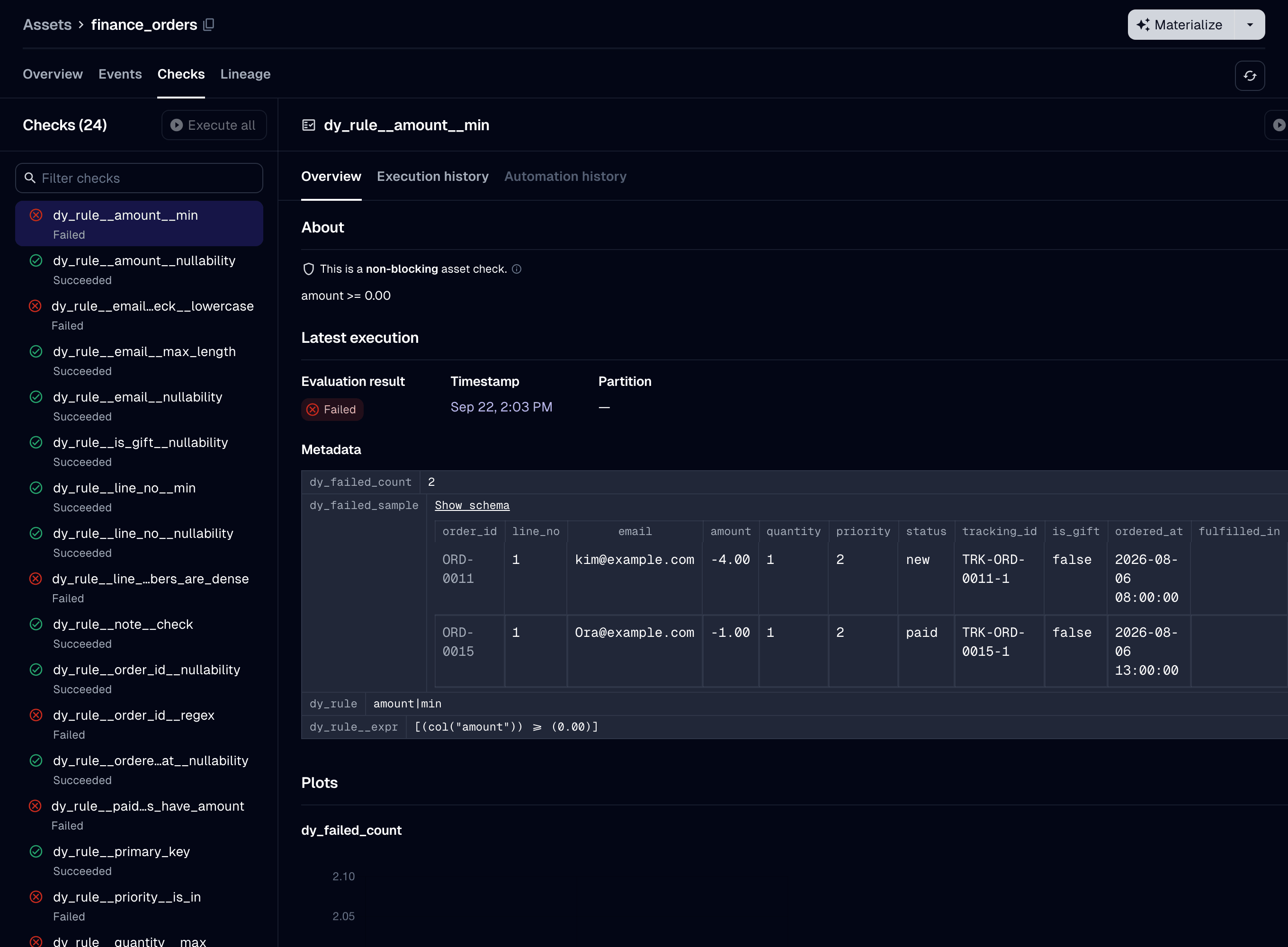
finance_orders, which has filter=False, after some rows failed an "error" rule. The selected check is blocking, and it failed.
"error" rule. The counts add up to more than the number of failing rows, because one row can fail several rules.Every row has to pass every "error" rule. To write the error rows to a separate table and the other rows to the table, set filter=True. To drop the failing rows yourself, drop them in the decorated function:
@dd.asset(OrdersSchema)
def orders(raw_orders: pl.DataFrame) -> pl.DataFrame:
    valid, _ = OrdersSchema.filter(raw_orders)
    return valid
Schema.filter also drops the rows that fail only "warn" rules. The asset’s checks then pass, because the package validates only the rows the function returns.
A row that fails only "warn" rules is written. So the table satisfies every "error" rule, but not necessarily every "warn" rule. An asset downstream that reads the table as dy.DataFrame[OrdersSchema] can rely only on the "error" rules. The table has the valid rows first, then the rows that failed only "warn" rules, so it does not keep the frame’s row order when a "warn" rule fails.
The column-schema check compares your frame’s dtypes with the schema’s and fails the run on a mismatch. Schema.filter runs with cast=False. A dtype mismatch is a bug in the pipeline. A silent cast can write wrong values. For example, a cast from Float64 to a declared Int64 turns 1.9 into 1, and every rule still passes.
The check reads only the frame’s column schema, so it does not collect a LazyFrame. It reports every mismatched column at once.
Extra columns and column order are not a mismatch. The check compares only the columns the schema declares, and Schema.filter drops any other column. The table has the schema’s columns in the schema’s order, whatever order the frame had:
@dd.asset(OrdersSchema)
def orders(raw_orders: pl.DataFrame) -> pl.DataFrame:
    # `raw_orders` has columns `OrdersSchema` does not declare, and `net` adds one more.
    return raw_orders.with_columns(net=pl.col("amount") * 0.8)
So a decorated function that returns extra columns needs no select, and no Schema.cast to drop them.
To cast, call Schema.cast in the decorated function:
@dd.asset(OrdersSchema)
def orders(raw_orders: pl.DataFrame) -> pl.DataFrame:
    return OrdersSchema.cast(raw_orders)
A Schema.cast call in the decorated function is the intended way to cast, not a workaround. Few assets need it. An asset needs it when its source returns a dtype that differs from the schema’s, most often on a read from a warehouse. DuckDB returns a DECIMAL column, and a literal such as 1.5 in a query, as a Polars Decimal. An asset whose schema declares Float64 for such a column fails the column-schema check on every run unless it casts. If you cast in every asset, check whether the dtypes differ at all (#88).