import dataframely as dy
import polars as pl

import dagster_dataframely as dd


class CustomersSchema(dy.Schema):
    """A storefront customer account."""

    customer_id = dy.String(primary_key=True, description="Account identifier.")
    email = dy.String(nullable=False, description="Address for receipts.")
    lifetime_value = dy.Float64(nullable=False, min=0.0, description="Spend to date.")


@dd.asset(CustomersSchema)
def customers(raw_customers: pl.DataFrame) -> pl.DataFrame:
    """Validate the storefront's customer accounts."""
return raw_customersGet started
dagster-dataframely attaches a Dataframely schema to a Dagster asset whose function returns a Polars frame. You declare the schema once, and dd.asset fills the Columns tab and reports each rule as an asset check. Below, you declare one asset, see what dd.asset adds to it in Dagster, and run it.
The asset’s checks exist as soon as the module imports, one per rule plus the column-schema check. By default, Dataframely adds a nullability rule to every column, and inf and nan rules to every float column:
[spec.name for spec in customers.check_specs]['dy_schema__columns',
'dy_rule__primary_key',
'dy_rule__customer_id__nullability',
'dy_rule__email__nullability',
'dy_rule__lifetime_value__nullability',
'dy_rule__lifetime_value__min',
'dy_rule__lifetime_value__inf',
'dy_rule__lifetime_value__nan']The two Python modules on this page come from the demo pipeline, and every image is a screenshot of it. The images show assets that use OrdersSchema, the schema the package ships in dd.data for its examples. From the dd.asset declaration above, you get:
The catalog’s Columns tab, filled in before the asset first runs: dtypes, descriptions, nullability, uniqueness, the primary key at table level, and every other column constraint beside its column.
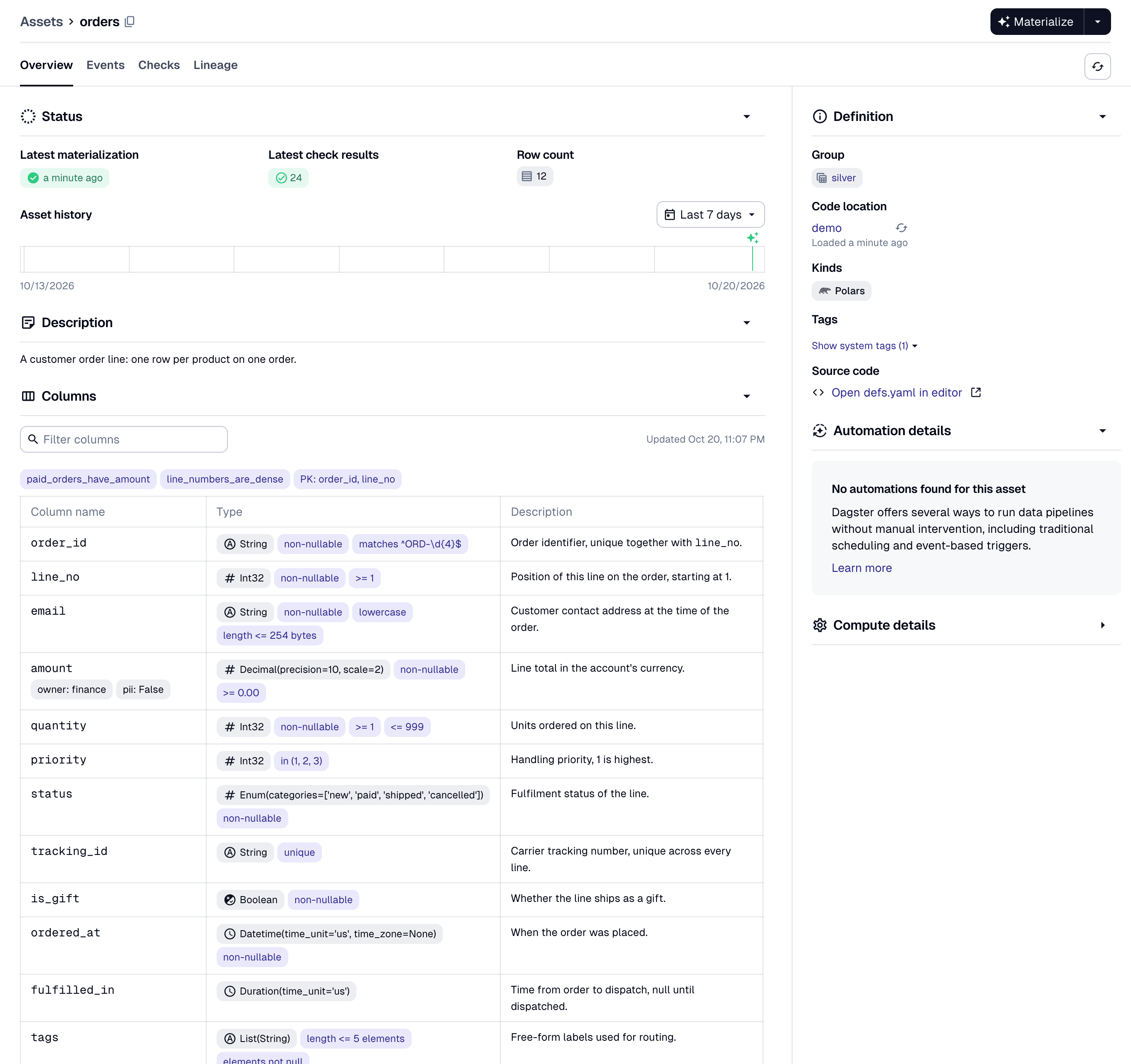
The catalog’s Columns tab for ordersshows every column with its dtype and description from the schema. The column tags onamountcome from itsmetadata=.One asset check per Dataframely rule, and each check has its own pass/fail history.
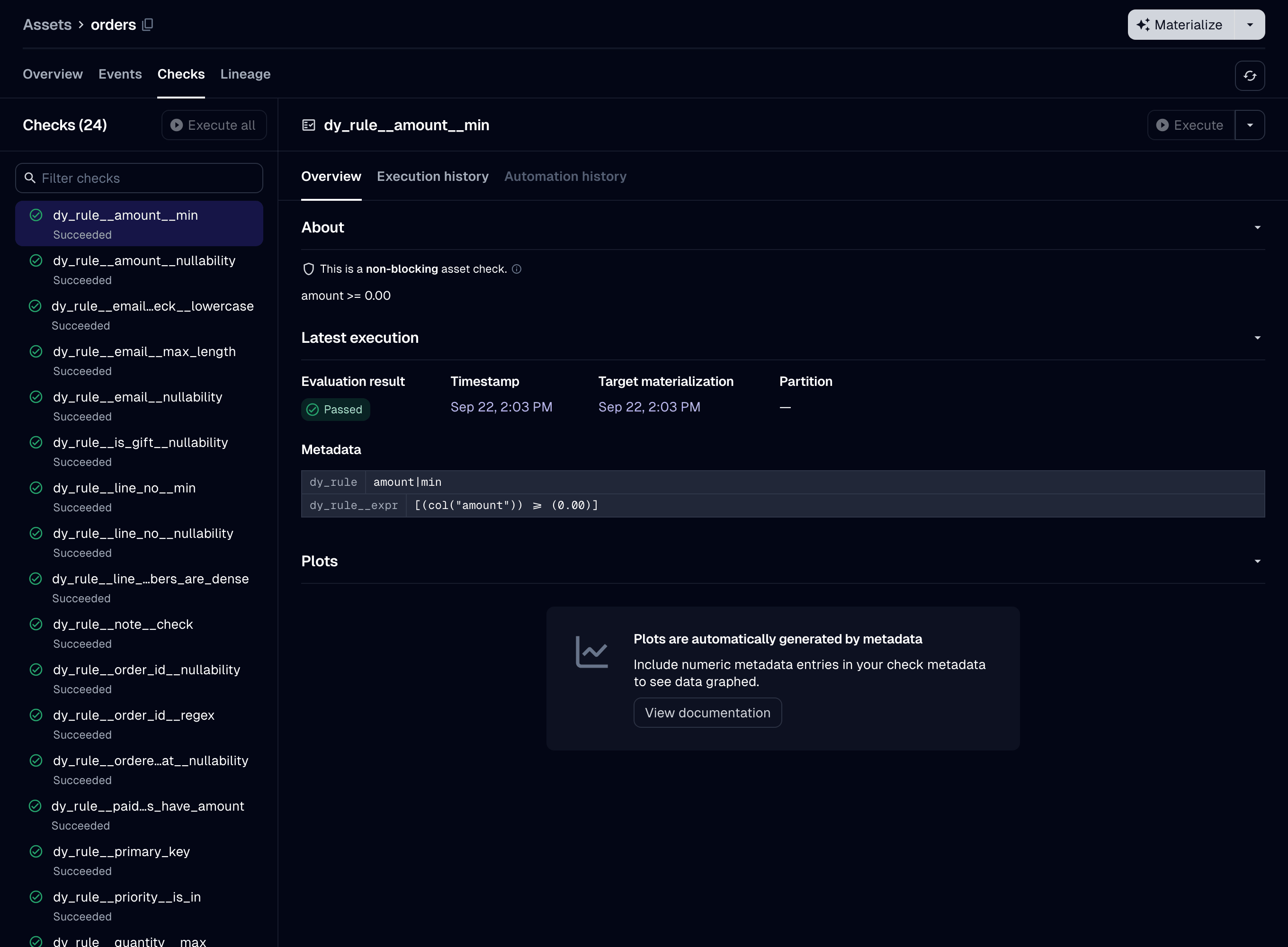
The Checks tab after a run with no failing rows, at the default granularity: one check per rule, each with its own history. The selected check’s description is its rendered constraint, and its metadata has the rule’s name and expression. A blocking column-schema check that compares the frame’s columns and dtypes with the schema’s, before
Schema.filterruns.
In this run log, the decorated function returned quantityasInt64, not the schema’sInt32. The failingdy_schema__columnscheck hasdataframely/column_schema_errors, which shows the expected and actual dtype. The step failure below it names the same column in the ColumnSchemaError message.A severity for each rule,
"error"by default or"warn", declared in the schema. A row that fails an"error"rule fails the run, and a row that fails only"warn"rules is written with a warning.A code version derived from the schema, so Dagster marks the asset stale after a schema edit.
Error rows, if you set
filter=True. A run writes the rows that failed an"error"rule to a table next to the asset’s, writes the other rows to the asset’s table, and succeeds. The run still fails when every row fails an"error"rule.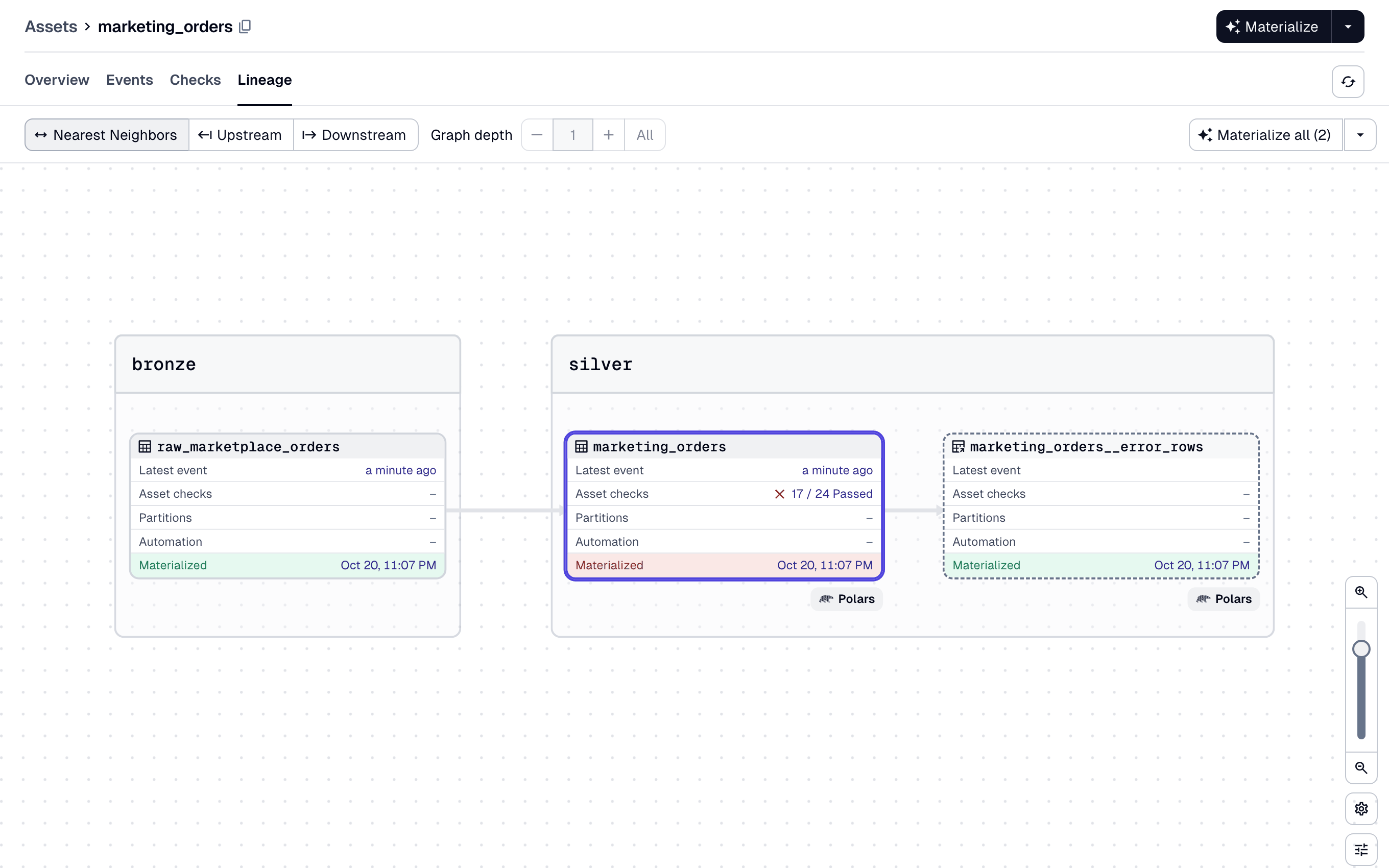
The lineage view shows the table, which materialized with 17 of its 24 checks passing. Its error rows are a separate node beside it. The table’s own step wrote them and logged their materialization, and Dagster draws them with a dashed outline because they are an external asset.
The decorated function is a normal Dagster asset function. Dagster passes upstream assets to it as parameters. It can also declare a context parameter. It returns a pl.DataFrame or a pl.LazyFrame, a dg.MaterializeResult whose value is one of those, or None.
dd.asset accepts every @dg.asset parameter under the same name, except six that Declaring an asset lists.
Package philosophy
Schema on write. dd.asset validates the frame before the asset writes it, never a table the asset reads. The checks run before the IO manager receives the frame, so the IO manager never writes a row that failed an "error" rule.
Use this package after ingestion, from bronze to silver to gold, to check that data is fit to publish. Load raw records with a permissive loader such as dlt, and declare a schema on the first table that other people query. Use another tool for ingestion-scale or larger-than-memory data.
The decorated function must return every column of the schema, with the schema’s dtype. A missing column or a dtype that differs from the schema’s fails the run, and the package never casts. There is no lenient mode. Extra columns and column order need no extra work: Schema.filter drops the columns the schema does not declare and returns the rest in the schema’s order.
Partial data needs a declaration, not a setting. The only parameter for it is filter=True. No environment variable sets it. Without it, one row that fails an "error" rule fails the run and the package writes nothing, so your last-known-good table is unchanged.
The decorator is strict, but you can use its parts without it. The package builds dd.asset from parts that it also exports under dd.wiring. Use them for an asset that dd.asset cannot build, such as one that writes its own storage, as Hand-wiring shows. For a table that something else already wrote, dd.build_rule_checks reports the schema’s rules as asset checks, as Rule checks shows.
Running the asset
To run customers, install the package, bind an IO manager, and materialize the asset from the Dagster UI. In a dg project, Dagster loads every module under defs/ automatically, so the IO manager needs one more file:
import dagster as dg

from dagster_dataframely.data import ParquetIOManager


@dg.definitions
def resources() -> dg.Definitions:
    """Bind the Parquet IO manager the pipeline writes through."""
    return dg.Definitions(
        resources={"io_manager": ParquetIOManager(base_dir="storage")}
    )
The package ships ParquetIOManager for its examples, so they need no IO manager library. In your own project, bind a library IO manager such as dagster-polars’ PolarsParquetIOManager.
customers reads raw_customers, so the asset that produces raw_customers goes under defs/ too. Run dg dev and materialize both from the UI.
After the run, the asset has four things:
- The catalog’s Columns tab, filled from
CustomersSchema, before the first run. - One asset check per rule, each with its own history.
- A materialization that has the row count, a row sample and statistics for each dtype group.
- A table, written by your IO manager.
To write the rows that fail an "error" rule to a separate table instead of failing the run, declare @dd.asset(CustomersSchema, filter=True), as Filtering error rows describes.
Where to go next
Read the Guide pages in order:
- Declaring an asset covers the decorator’s parameters, the code version and what the function may return.
- Validation lists the five kinds of run and what each one writes.
- Rule severity covers declaring a
"warn"rule and which checks are blocking. - Filtering error rows covers
filter=Trueand the error rows. - What a run produces lists every metadata key a run writes.
- Testing an asset covers testing an asset by calling it, with no run.
- Partitioning covers an asset with a
partitions_def. LazyFrames covers apl.LazyFramethat the asset reads or returns.- Collection checks covers
dd.build_collection_checks, which reports a DataframelyCollection’s collection filters as asset checks. - Rule checks covers
dd.build_rule_checks, which reports a schema’s rules as asset checks on an asset thatdd.assetdid not build.
The Details pages are for looking something up: Settings, Naming, Errors, Hand-wiring and Upgrading.